Search or browse all guides
Quick visual guide
Billing is the source of truth for the current plan, credits, and available actions.
- 1
Read the credit cards
Monthly Credits reset with the plan. Extra Credits stay available for 90 days after purchase.
 Credits
 - 2
Check the active plan
The active-plan card shows billing status and the actions available to the owner.
Active plan - 3
Compare plans
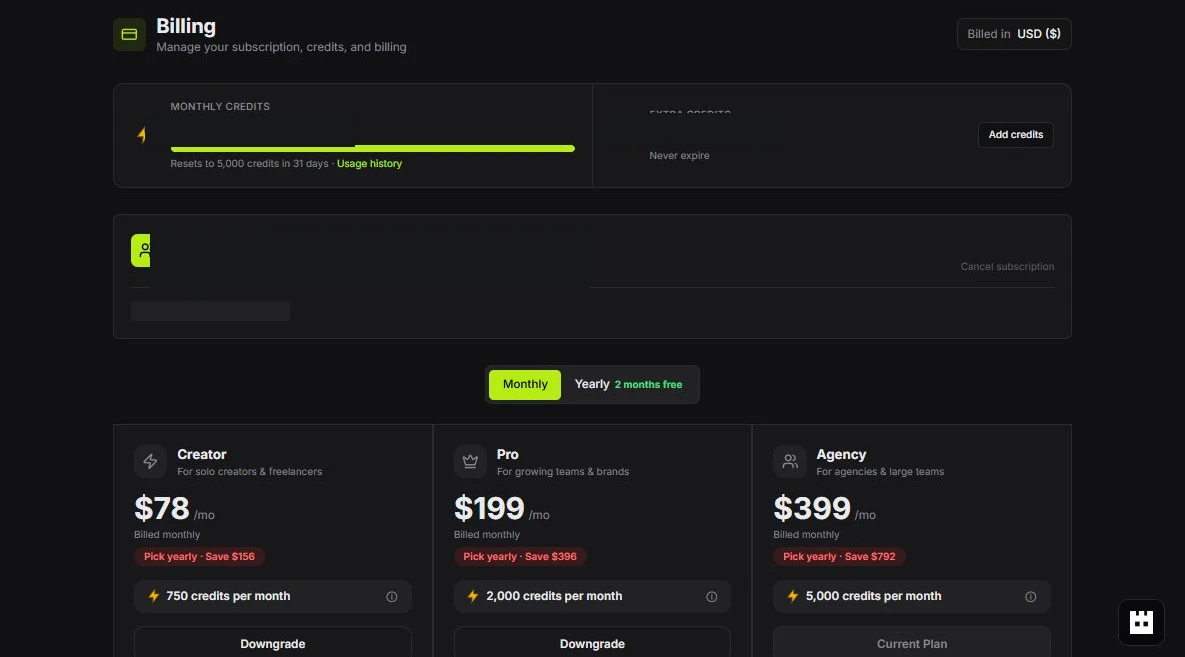
Use Monthly or Yearly, then compare the plan cards before confirming a change.
Compare plans
Red labels show the exact control to use.
Detailed referenceOpen this for definitions, limits, examples, and troubleshooting.
Plans control feature access
Your current workspace plan determines feature availability, usage limits, and included credits. The pricing page and Billing screen are the current source of truth for plan names, limits, and prices. Each plan includes one seat for the subscription owner. REST API access is available on Pro and Agency. MCP access is included with Creator, Pro, and Agency.
Pricing lists Meta Ads Launcher under Launch, immediately after Research, and shows ad accounts above tracked brands. Creator includes 1 ad account and Pro 5 in total, shared across all active workspaces owned by the subscriber; Agency has unlimited ad accounts. Like tracked brands, adding workspaces or team members does not increase a capped allowance. The ad-account allowance does not reset each month. Each distinct Meta account used for publishing through a current connection counts once across those workspaces; failed launches with no published ads do not use a slot, while unresolved launches retain their slot. Viewing an account does not use a publishing slot. Disconnecting Meta releases that workspace's accounts unless they are still used through another workspace connection. These plan allowances are separate from Meta API request limits, and there is no monthly cap on the number of ads published. Plan cards show a seat limit: the owner's included seat plus the paid extra seats the plan allows; seat prices are unchanged. Every plan includes MCP access for compatible AI clients. Open Ads Manager at /ad-manager to use the launcher. Publishing does not spend Tartol generation credits.
Current subscription prices
These USD prices apply to new subscriptions and customer-confirmed plan or billing-cycle changes. Annual plans charge the full year upfront at the discounted rate. Other supported currencies keep their regional pricing and annual discounts, rounded to whole local units; choose your currency on the pricing page to see the exact amount. Included credits refill monthly on both monthly and annual plans, in every supported currency. Features and extra-seat prices are unchanged.
| Plan | Monthly billing (USD) | Annual billing (USD) | Credits per month | Ad accounts (shared total) |
|---|---|---|---|---|
| Creator | $97/month | $972/year ($81/month) | 750 | 1 |
| Pro | $297/month | $2976/year ($248/month) | 2,500 | 5 |
| Agency | $497/month | $4980/year ($415/month) | 5,000 | Unlimited |
Starting a free trial checks your card
Every plan, monthly or yearly, starts with a 7-day free trial, and nothing is charged that day. Right after checkout Tartol checks the card before the trial unlocks. Prepaid cards can’t start a trial. Other cards get a small verification hold of about $1 (or the same in your currency), which is released straight away and never charged; your bank may briefly show it as pending.
If the card is prepaid or the bank declines the hold, the trial doesn’t start and nothing is charged. Tartol shows Use a different card, which reopens checkout for the same plan with the free trial still available. Banks often decline cards that don’t allow online or international payments; a credit card or another debit card usually works. The check runs only in the browser checkout flow, not through the public REST API or MCP. Tartol Agent explains the check and directs users to Billing.
Existing subscriptions keep their price
An existing active subscription keeps its original recurring price in its original currency and billing cycle. The new advertised prices do not reprice renewals, change a current trial’s agreed price, or create an extra charge. Adding seats, updating a payment method, or resuming a cancellation before it ends does not replace the base-plan price. Existing discount terms continue to apply.
If you choose a different plan or billing cycle, review and confirm the current price in Billing. After a subscription ends, a new subscription uses current pricing. Billing shows your actual subscription price and Stripe’s next invoice; the public pricing page shows prices for new purchases. If the invoice cannot load, use Retry instead of treating a public price as your renewal amount.
Manage subscriptions and payment confirmations in the authenticated Billing page at /billing. Billing mutations and private invoice/payment details are intentionally unavailable through the public REST API and MCP because they require the account owner’s payment flow. Tartol Agent can explain pricing and grandfathering and guide you to Billing; it cannot change a subscription or infer your renewal charge from public prices.
Credits pay for generation work
Pro includes 2,500 credits per month. Existing Pro subscriptions receive the increased allowance at their next normal monthly refill, including annual subscriptions and subscriptions that keep an older price. The increase does not reprice the subscription, reset usage mid-cycle, or remove bonus credits. New paid Pro activations receive the current allowance.
Eligible UI, REST API, and MCP generation actions spend from the same account credit pool; the allowance increase does not change plan eligibility, workspace permissions, connection scopes, or per-action credit costs. Manage billing in /billing; public REST API and MCP clients cannot change subscription allowances.
- Image generation, copy generation, AI edits, translations, and some AI-assisted product workflows can spend credits.
- Tartol shows the applicable cost before a confirmed generation action.
- Background processing does not mean the same job should be started again.
- Team credit limits can help owners control member usage where supported.
When a trial or subscription ends
Unavailable features become locked according to current plan rules. Existing API keys and OAuth connections cannot bypass plan loss; each request rechecks current eligibility. Upgrade from Billing when you are ready to restore paid access. A fully discounted subscription with a zero-dollar renewal invoice remains active while Stripe finalizes that invoice; it is not treated as unpaid during the renewal webhook sequence.