Search or browse all guides
Quick visual guide
Tartol Agent explains. Tartol pages and connected MCP clients perform supported actions.
- 1
Ask for guidance
Ask how a workflow works or how to troubleshoot a visible problem.
 Ask for steps
 - 2
Do the work on the page
Follow the linked Tartol route. The Agent does not click, generate, delete, or confirm for you.
 You control this page
 - 3
Use MCP only when supported
Settings > Integrations shows the separate MCP connection for compatible AI clients.
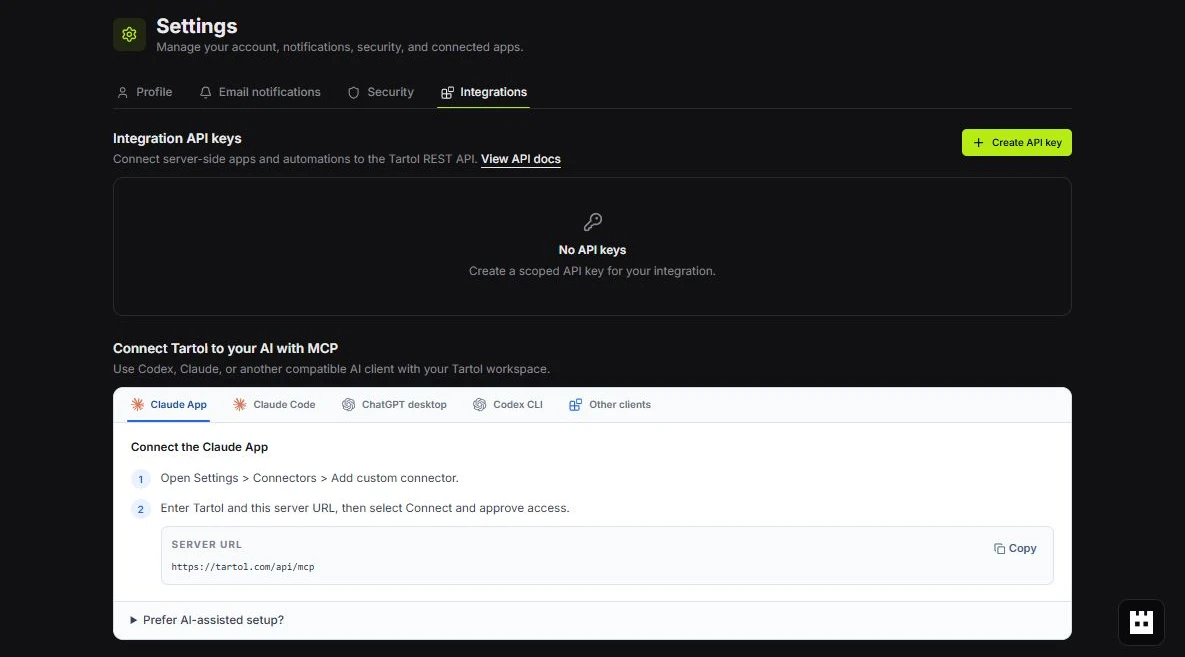 MCP setup
Red labels show the exact control to use.
Detailed referenceOpen this for definitions, limits, examples, and troubleshooting.
Why the Agent does not perform actions
Tartol Agent is deliberately guidance-only. It explains how to complete a workflow in the Tartol interface and can point to a documented MCP workflow, but it cannot create, edit, delete, generate, send, confirm, or otherwise change anything from its chat.
Read-only context stays within your access
- The Agent receives only minimized context for the signed-in user and active workspace.
- Workspace role, plan, and feature visibility still shape the answer.
- The Agent cannot use records from another workspace or reveal hidden credentials.
- Displaying or discussing account context never changes the underlying data.
Use MCP for supported conversational actions
A compatible external AI client can connect to Tartol MCP when the current plan permits it. MCP independently enforces OAuth scopes, live workspace membership, role permissions, capability boundaries, and credit-spend confirmation requirements. See /docs/mcp-quickstart for setup and /docs/mcp-tools-and-capabilities for the current tool list.
What Tartol Agent is for
Tartol Agent is focused on Tartol workflows. It is not intended as a general web researcher, coding assistant, or replacement for professional legal, financial, or medical advice.