Search or browse all guides
Quick visual guide
Create the smallest useful key and store it only in server-side secret storage.
- 1
Choose Create API key
Open Settings > Integrations and select Create API key.
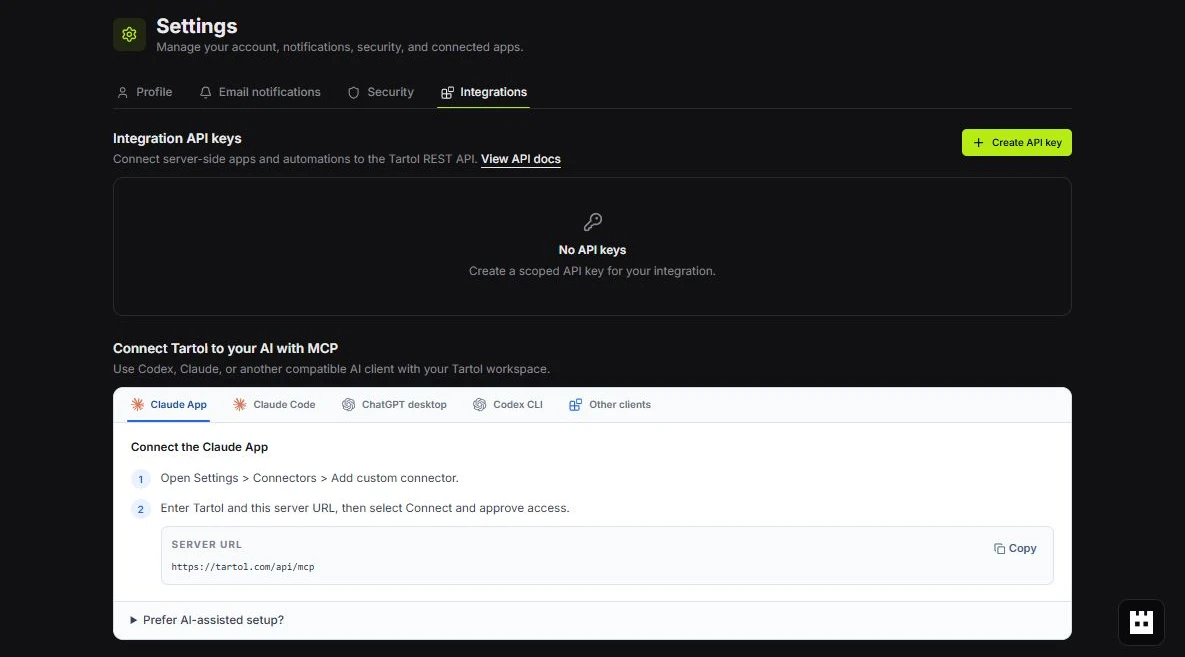 Create API key
 - 2
Set its access
Name the key, choose one workspace and expiration, then enable Write only when needed.
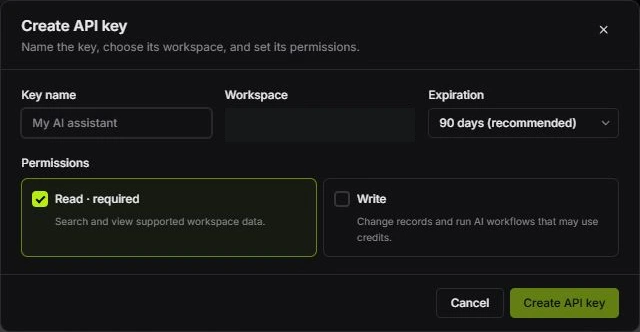 Choose permissions
 - 3
Copy it once
After creation, copy the key immediately and keep it out of browser code, chat, and screenshots.
Create when ready
Red labels show the exact control to use.
Detailed referenceOpen this for definitions, limits, examples, and troubleshooting.
When to use a key
Use an API key for server-side REST integrations, scheduled jobs, and trusted automation built around Tartol. Keys are workspace-bound and cannot exceed the creator’s live permissions. MCP clients connect separately through OAuth.
Create the key
- 1Open Settings > IntegrationsThe Integration API keys section appears before MCP connections.
- 2Choose Create API keyName it after the client or job, not a person’s password.
- 3Choose permissionsRead is always included. Add Write only when needed; it also enables supported credit-consuming generation.
- 4Choose an expirationAvailable expirations range from 30 to 365 days.
- 5Copy it onceStore the revealed value in the client’s secret or environment-variable system. Tartol does not show the full key again.
Pass the key securely
Never paste a real key into chat, source code, screenshots, analytics, or a support ticket. Use your client’s secret manager and keep the variable out of version control.
Authorization: Bearer $TARTOL_API_KEY
REST base URL: https://tartol.com/api/v1
Rotate or revoke a key
Create the replacement first, update the client, verify it, then revoke the old key. Revoke immediately if it was exposed or a client is no longer trusted. Plan loss or permission changes also prevent otherwise valid keys from exceeding current access.