Search or browse all guides
Quick visual guide
Keep a backup sign-in method and review sessions you do not recognize.
- 1
Open Security
Go to Settings and choose the Security tab.
 Security
 - 2
Review sign-in methods
Check Google and Password status, then add or update a backup method if needed.
Sign-in methods - 3
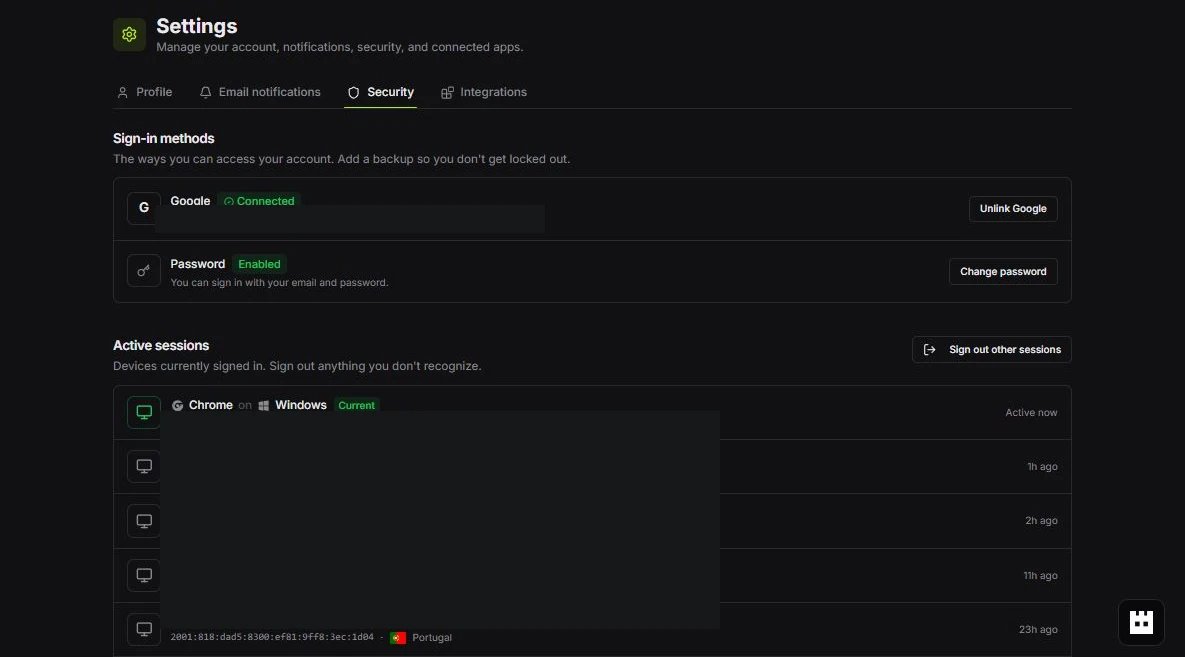
Review active sessions
Use Sign out other sessions when a listed device or location is unfamiliar.
Active sessions
Red labels show the exact control to use.
Detailed referenceOpen this for definitions, limits, examples, and troubleshooting.
Security basics
- Use a unique account password and protect the email account used to sign in.
- Review active sessions and sign out devices you no longer recognize.
- Use individual teammate accounts instead of sharing one login.
- Give each integration its own expiring credential and minimum scopes.
- Revoke credentials immediately when a client, device, or teammate is no longer trusted.
Where to manage security
Open Settings > Security for account and session controls. Open Settings > Integrations for API keys and OAuth connections. Workspace owners should also review Team roles and pending invitations. Tartol verifies a healthy browser session with a read-only check and refreshes the rotating token only when the server explicitly reports that it has expired. Temporary database or authentication-provider outages keep the current session recoverable instead of repeatedly rotating tokens or silently signing the user out.
Log out of this browser
Open your profile menu and choose Log Out. Tartol waits for the server to clear this browser’s login cookies before returning protected pages to Sign In. Other Tartol tabs on the same site also sign out; independent browsers and devices keep their sessions. Reloading the page should keep you signed out until you explicitly sign in again.
If the logout request cannot reach Tartol, the page shows “Could not log out. Please try again.” Restore your connection and choose Log Out again. A background session check must not sign you back in after a completed logout. Signing out does not revoke API keys or MCP OAuth connections; manage those separately in Settings > Integrations. Browser logout is intentionally unavailable through public REST and MCP, whose credentials do not represent your browser session. Tartol Agent can explain these steps and troubleshoot logout without ending sessions itself.
Exports and account lifecycle
Data export, account deletion, workspace deletion, billing changes, and similar sensitive controls may require a direct authenticated UI flow or extra verification. Complete them only when you understand the impact. To delete your account, open Settings > Security, scroll to Delete account, enter DELETE MY ACCOUNT, request the confirmation email, and follow its link. Nothing is disabled until you confirm. To request deletion only of data received through a Meta connection, follow the public instructions at /data-deletion or email privacy@tartol.com from your Tartol account email.