Search or browse all guides
Quick visual guide
Grant only the scopes the connected client needs.
- 1
Choose the client
Open the correct client tab in Settings > Integrations.
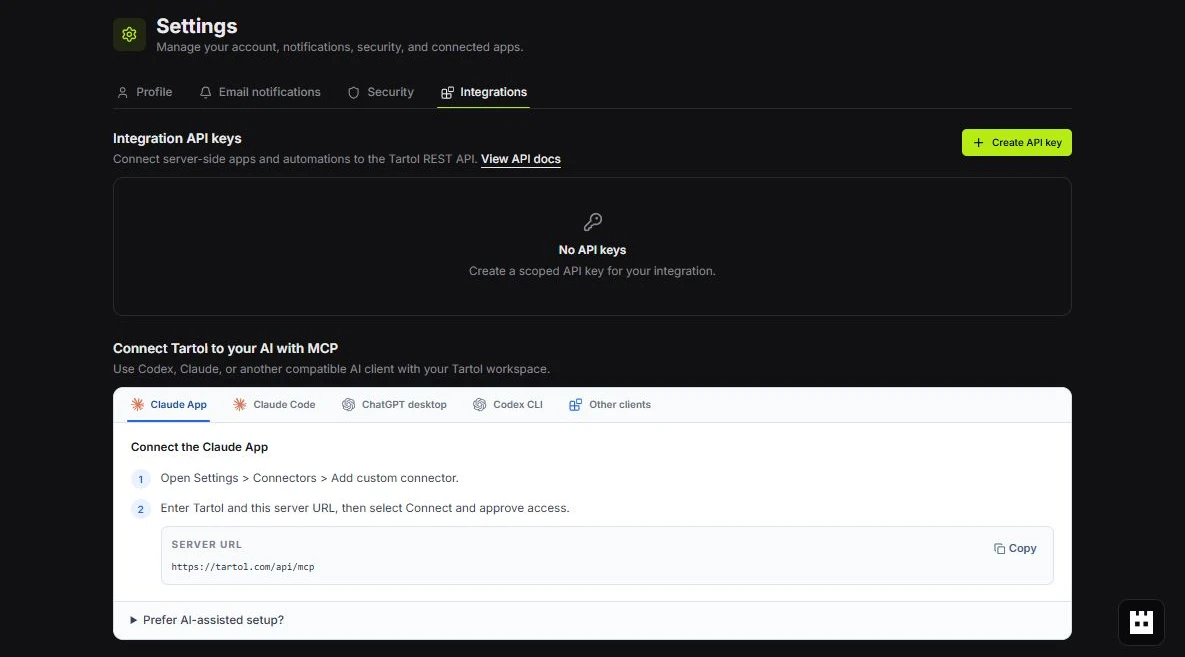 Client tab
 - 2
Review before approving
On the authorization screen, read the requested read, write, and generate access.
 Review access
 - 3
Reconnect to change scope
Disconnect and authorize again when the client needs a different scope set.
Reconnect here
Red labels show the exact control to use.
Detailed referenceOpen this for definitions, limits, examples, and troubleshooting.
Available scopes
| Scope | Allows |
|---|---|
| tartol:read | Search, fetch, and query permission-visible workspace data. |
| tartol:write | Prepare and execute supported non-generation workspace changes. |
| tartol:generate | Prepare and execute supported credit-spending generation actions. |
Scope rules
- Read is required whenever Write or Generate is requested.
- The authorization page groups the technical Write and Generate scopes under one simpler Edit switch.
- Scopes are a ceiling, not a replacement for workspace permissions.
- All workspaces grants only the eligible workspaces listed when you authorize; reconnect to add a workspace created later.
- Plan, role, feature, record ownership, and credit checks still happen on each request.
- Use a separate credential per client or automation so you can revoke it independently.
Practical choices
| Use case | Recommended scopes |
|---|---|
| Reporting or research assistant | tartol:read |
| Organizer that updates boards or records | tartol:read + tartol:write |
| Creative automation | tartol:read + tartol:generate, plus Write only if it also organizes records |