Features

Your entire ad workflow in one platform

Research, clone, and launch ads from one place. Find winning ads, adapt them for your products, and publish to Meta with Ads Manager (limited preview).

Research

Start with your brand, then study what works

Import your store, research competitor ads from the Meta Ad Library, track brands, and keep the best ideas in one swipe file.

In Tartol: Brands

Brand & Product Import

Paste your store or landing page URL and Tartol pulls in your products and brand details.

  • Import products, prices, images, and details
  • Capture your logo, colors, language, and brand summary
  • Review and edit everything before generating
In Tartol: Brands › product › Customer Research

Customer Research

Tartol studies real customer discussions to find the audiences, desires, and objections behind your product. Image Ads and Copywriter use that research.

  • Find the audiences most likely to care about your product
  • See what customers want, what holds them back, and the words they use
  • Open the real comments behind each finding
In Tartol: Research › Discovery

Ad Discovery

Find long-running competitor ads from the Meta Ad Library and get ideas for your next campaign.

  • Filter competitor ads by market, format, or audience
  • Sort by longest running to surface durable creative ideas
  • Open any ad to review its creative, copy, and details
In Tartol: Research › Brand Tracker

Brand Tracker

Follow competitor ads, hooks, landing pages, and launches in one place.

  • Track new, active, and paused ads on a schedule
  • Review each brand’s ads, landing pages, and hooks
  • See dated launch and pause activity in one view
  • Tracked brands per plan: 5 on Creator, 15 on Pro and 50 on Agency
In Tartol: Meta Ad Library, in your browser

Chrome Extension

Save ad and Track brand buttons inside the Meta Ad Library. Free to install; saving needs an active plan or the free trial.

  • Save Meta ads to one or more boards without leaving the Ad Library
  • Track the advertiser from its Ad Library page
  • Choose the workspace your saves go to; saving never uses credits
In Tartol: Research › Saved

Saved

Your swipe file: every ad you save from Discovery, Brand Tracker, or the extension.

  • Organize with boards, folders, tags, and ratings
  • Search with filters and saved presets
  • Share an ad or send a supported image ad to Clone

Create

Turn proven ideas into your own creatives

Clone winning ads for your product, generate image ads and variants, edit and translate them, and write the copy.

In Tartol: Clone on a supported image ad

Clone Winning Ads

Turn a supported image ad you find or save into an on-brand creative for your product.

  • Start from a reference in Discovery, Brand Tracker, or Saved
  • Rebuild the idea around your product and brand
  • Compare the reference with the generated creative
In Tartol: Creative Studio › Image Ads

Ad Generator

Automatically generate on-brand ads from your product and winning ad patterns.

  • Let Tartol pick a reference ad, or choose a template or your own upload
  • Build with your product photos, features, and benefits
  • Generate the creative with optional post text
In Tartol: Creative Studio › Generate Variants

Ad Variants

Turn a winning ad into fresh variants and keep scaling what works.

  • Open a generated ad and choose Generate Variants
  • Get fresh creative directions for the same product
  • Compare the set and keep the strongest ones for testing
In Tartol: Creative Studio › Editor

Ad Editor

Turn one ad into the exact creative your next campaign needs.

  • Describe exactly what you want to change
  • Remove unwanted text, labels, or visual elements
  • Keep the rest of the ad’s design intact
In Tartol: Creative Studio › Editor › Translate

Ad Translator

Translate ads for new markets without rebuilding the original design.

  • Translate ad text for a new language or market
  • Keep the original composition and visual hierarchy
  • Create localized versions without rebuilding the design
In Tartol: Creative Studio › Copywriter

Copy Generator

Generate persuasive hooks, ads, emails, and scripts built to sell.

  • Create hooks, ad copy, emails, or video scripts
  • Use your product details and target audience as context
  • Pick a style (Storytelling, Punchy, or Explanation) or paste a reference ad
In Tartol: Creative Studio › Copywriter

Clone Video Scripts

Turn the transcript of any video ad you like into a new script for your product.

  • Start from the transcript of a video ad
  • Keep the useful structure, pacing, and selling angle
  • Generate a new script tailored to your product

Launch

Publish to Meta with Ads Manager

Ads Manager is in limited preview. Without preview access, download your creatives and use them in your existing ad workflow.

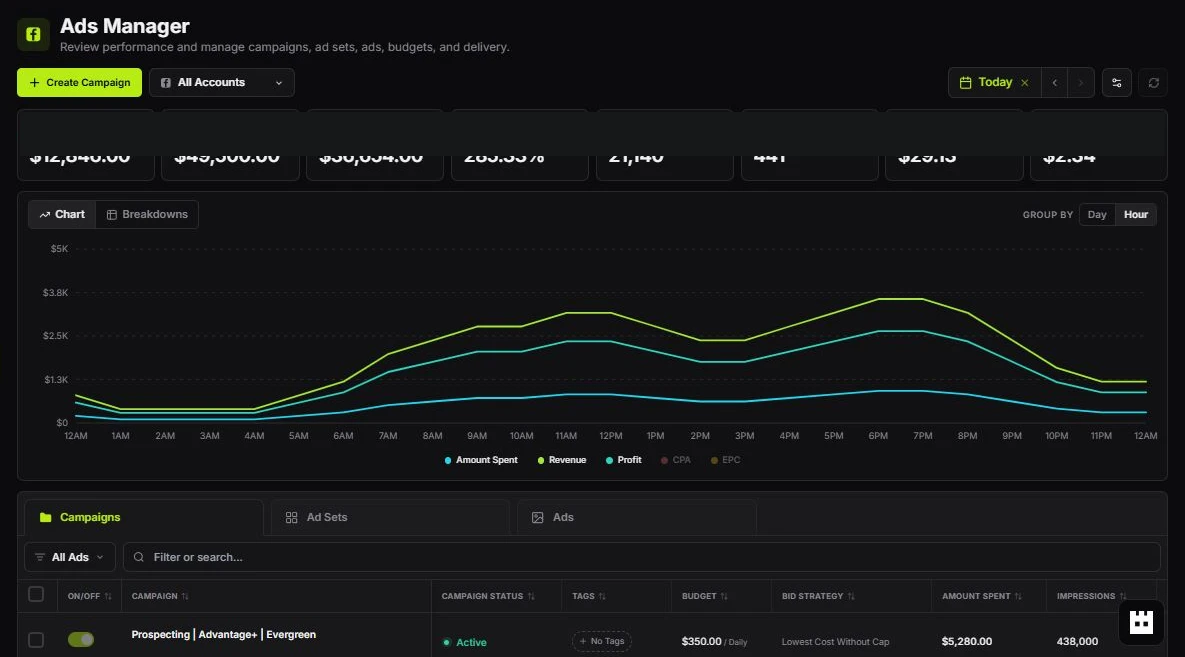
Tartol Ads Manager with spend and revenue charts above the campaigns table
In Tartol: Launch › Ads ManagerLimited preview

Ads Manager

Publish your Tartol creatives to Meta and review performance in one place. Connecting Meta needs a workspace owner or admin; publishing needs an eligible plan and Meta permissions.

  • Connect Meta, then choose the ad account and Facebook Page
  • Create a new Sales or Traffic campaign, or add an ad set to an existing one
  • New campaigns and ad sets start Paused, so you review them before they run
  • Compare spend, revenue, ROI, and CPA across campaigns, ad sets, and ads

Integrations & team

Work with your team and your AI tools

Share workspaces with teammates, get answers from Tartol Agent, and connect Tartol to your own AI client or code.

In Tartol: Workspace

Workspaces & roles

Keep each brand or client in its own workspace and give every teammate the access they need.

  • Workspaces: 1 on Creator, 2 on Pro and unlimited on Agency
  • Seats: up to 3 on Creator, 5 on Pro and 25 on Agency (1 included, extra seats are paid add-ons)
  • Admin, Member, and Viewer roles plus per-seat credit limits on Pro and Agency
Every plan

Tartol Agent

Ask how any Tartol workflow works and get step-by-step answers with the current page names, plus help when something goes wrong.

Learn how
Creator, Pro, and Agency

MCP for AI clients

Connect ChatGPT, Claude, Claude Code, Codex, or another compatible client with OAuth, then search ads and generate ads from the chat.

Set up MCP
Pro and Agency

REST API

Read Tartol data and run supported workflows from your own backend, scheduled jobs, or custom apps over HTTPS and JSON.

Read the API overview

Ready to try it?

Try Tartol free for 7 days. Plans start from $81/mo billed yearly, and the Knowledge Base explains every feature step by step.