Search or browse all guides
Quick visual guide
Use the Affiliate Panel for the referral link, commission status, and funnel.
- 1
Check the terms shown
The top of the panel shows the current first-payment and renewal commission terms.
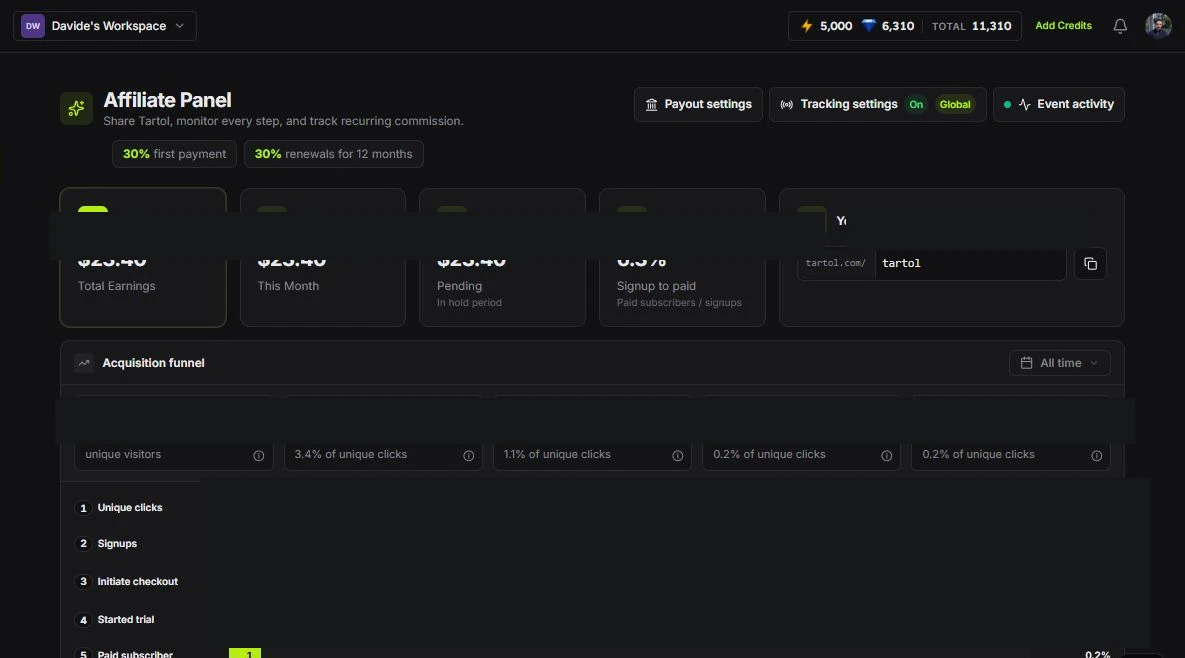 Current terms
 - 2
Copy the referral link
Use the copy button beside Your referral link.
Copy link - 3
Read the funnel
Use Acquisition funnel to see how visits move through Signups, Checkout started, Trial started, and Subscribed.
Acquisition funnel
Red labels show the exact control to use.
Detailed referenceOpen this for definitions, limits, examples, and troubleshooting.
Join the affiliate program
Choose Affiliate program in the avatar menu (or open /affiliates) to see the program terms and an earnings calculator. Any signed-in user can apply with a short form, and the affiliate account and referral link are created as soon as you submit. After that, the Affiliates sidebar item also appears. People who sign up through your link get 20% off their first subscription payment for three hours, applied automatically at checkout with no code.
Use the dashboard
- Copy the referral link shown for your account.
- Custom referral URLs cannot use an existing Tartol page name, such as ad-manager. Opening an app page on its own does not count as an affiliate visit.
- Review attributed signups, customers, commissions, and payout status when available.
- Use Tartol’s displayed terms and status as the source of truth for eligibility.
Configure affiliate tracking
Choose Tracking settings to open the Meta Pixel and Conversions API controls directly. Opening this panel does not send a verification email or ask for a code. Saved Conversions API tokens remain write-only and are never returned to the browser.
Questions about attribution
Contact support with the referral context and approximate time. Do not send a customer’s password, payment details, or private account credentials.