Search or browse all guides
Quick visual guide
Connect first, then check live capabilities before calling a tool.
- 1
Connect the client
Use the client-specific instructions in Settings > Integrations.
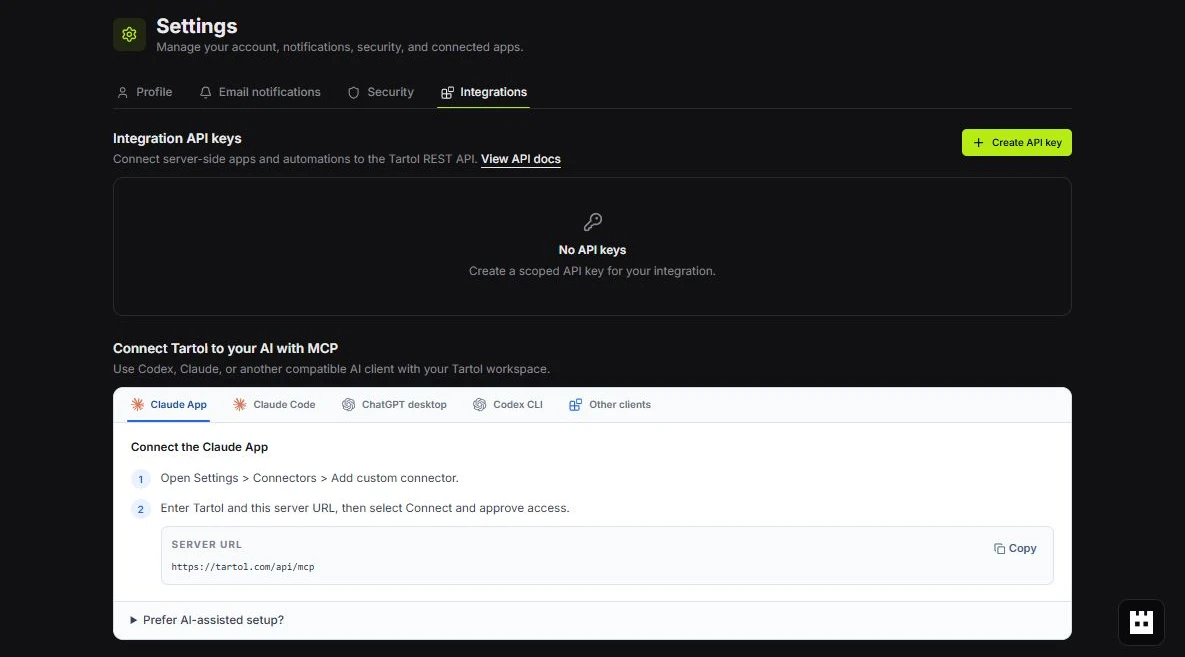 Pick your client
 - 2
Check capabilities
Call whoami and list_capabilities before assuming a tool is available.
 Tool reference
 - 3
Use the documented action flow
For mutations, describe or prepare the action first, then execute only after approval.
Follow the contract
Red labels show the exact control to use.
Detailed referenceOpen this for definitions, limits, examples, and troubleshooting.
Tool list
| Tool | Required scope | Purpose |
|---|---|---|
| whoami | Any valid connection | Return the workspace, role, authentication method, and scopes. |
| list_capabilities | Any valid connection | List the views and actions available to this connection. |
| search | tartol:read | Find records and return stable tartol:// IDs. |
| fetch | tartol:read | Read one resource by a stable ID. |
| query_workspace | tartol:read | Read an available workspace view with filters. |
| get_generation_result | tartol:read | Poll image, video, or copy generation and return completed media previews. |
| describe_action | Write or Generate | Return the schema and example for one available action. |
| execute_action | Write | Validate and run an action that does not spend workspace credits. |
| prepare_action | Write or Generate | Validate a credit-spending or independently approved external action and return its exact confirmation summary. |
| execute_prepared_action | Write or Generate | Run one explicitly approved prepared action. |
Supported Tartol workflows
Tartol MCP is Tartol’s conversational action surface for compatible external AI clients. Tartol Agent is the separate in-app guidance surface: it explains workflows and troubleshooting but does not perform actions.
Tartol MCP focuses on bounded workflows that are useful and understandable in an AI conversation. It does not mirror every internal or visual control in the web app. The underlying Tartol feature can remain available in the app even when it is intentionally excluded from MCP.
- Research and fetch Discovery ads, saved ads, brands, products, creatives, copy, tracked brands, and media.
- Organize Saved Ads, Brand Tracker, product strategy, and Media Library records without exposing structural or cascading deletion.
- Create and update brands, products, audiences, and marketing angles.
- Use describe_action for the current standardized productType and billingPeriod values; free-form product categories are rejected by catalog write actions.
- Generate, edit, translate, organize, and save image and copy results with the required credit approval flow.
- Read the Ad Manager overview/history and fixed 30-day performance view, then prepare and execute an exact saved draft as Paused ads after independent approval.
whoami and list_capabilities
{}{
"action_offset": 0,
"action_limit": 20
}| Tool | Input fields |
|---|---|
| whoami | No input fields. |
| list_capabilities | action_offset: integer ≥ 0. action_limit: 1–25, default 20. |
search
Searches records visible to the connection. Use the returned tartol:// ID with fetch or an action.
{
  "query": "Acme protein powder",
  "kinds": ["brand", "product"],
  "limit": 10
}| Field | Required | Rules |
|---|---|---|
| query | Yes | 1–200 characters. |
| kinds | No | Up to 5 of: brand, product, saved_ad, discovery_ad, creative, copy, tracked_brand, media_asset. |
| limit | No | 1–20; default 10. |
fetch
Returns one current-workspace resource. The ID must come from search, fetch, or query_workspace.
{
  "id": "tartol://product/123"
}
query_workspace
Reads one view listed by list_capabilities. view is required and limit is 1–12. Available views depend on the connection.
{
  "view": "discovery_ads",
  "preset": "eu_winners",
  "sort": "longest_running",
  "running_days_min": 14,
  "limit": 12
}{
"view": "meta_ads_overview"
}{
"view": "meta_ads_performance"
}| Filter group | Fields |
|---|---|
| General | view, search, limit |
| Ad order | sort: newest, oldest, or longest_running |
| Catalog | catalog_kind, product_id |
| Ad attributes | platform, format, status, niche, product_category, cta, text_presence |
| Discovery presets | ready_to_scale, native_ads, eu_winners |
| Ranges | description_length_min/max, running_days_min/max |
| EU metrics | eu_only, eu_views_min/max, eu_spend_min/max |
| Page metrics | page_reach_min/max, page_spend_min/max, page_active_ads_min/max, page_total_ads_min/max |
| Identifiers | platform_ad_id, folder_id |
Media previews and asynchronous results
Tartol returns important images, logos, product art, creatives, ads, and screenshots as native MCP image content with an exact detected MIME type, in addition to structured data. This lets compatible AI clients render the image bytes directly instead of trying to preview an external resource URL. Video and other unsupported or oversized media remain typed resource links because MCP does not define a native video content block and tool responses must stay bounded.
- After scan_brand_from_url or rescan_brand, poll fetch with the returned brand resource_id until scanStatus is completed or failed. The completed brand response includes its products and their media.
- After generate_image or generate_copy starts, poll get_generation_result with the returned job ID until completed or failed.
- Present the important record details and every attached native image or media resource link. A client that cannot embed a media type should still expose its clickable link.
{
  "kind": "image",
  "job_id": 456
}{
"kind": "copy",
"job_id": 789
}Action execution and approval
Call describe_action before acting. It returns the current JSON Schema, constraints, example, approval_required value, and predictable cost inputs where available. Most actions that do not spend workspace credits use execute_action directly. Credit-spending actions and independently approved external actions use the prepare, review, approve, and execute flow. If a free prerequisite such as a new-brand scan comes before image generation, quote the downstream image cost and ask for approval before starting the scan.
For generate_product_audiences and generate_product_angles, count is required from 1 to 8 even though Tartol’s UI defaults to 1. Each item costs 5 credits, and an audience includes its background portrait. The Product Strategy view returns generation_guidance plus audiences.data[].id. To use one for Image Ads, set generationConfig.autoAudience to false and generationConfig.selectedAudienceId to that numeric ID. Never send avatarUrl or avatarStoragePath; Tartol resolves eligible portrait evidence after validating ownership.
For launch_meta_ads_draft, copy draftId and draftUpdatedAt from meta_ads_overview. prepare_action revalidates the exact saved draft and returns a paused-only summary. After a person approves it, execute_prepared_action rechecks freshness and publishes. Use meta_ads_performance for the fixed 30-day selected-account report. MCP cannot connect Meta, change defaults, create campaign structures, change delivery, choose custom report controls, import provider links, submit unsaved rows, or activate ads.
{
  "action_type": "create_saved_ad_board"
}{
"action_type": "create_saved_ad_board",
"arguments": {
"name": "Strong product demos"
}
}{
"action_type": "detect_brand_products",
"arguments": {
"targetId": 123
}
}{
"action_type": "launch_meta_ads_draft",
"arguments": {
"draftId": "00000000-0000-4000-8000-000000000000",
"draftUpdatedAt": "2026-08-14T12:00:00.000Z"
}
}{
"pending_action_id": "PASTE_RETURNED_ID",
"confirm": true
}| Tool | Required fields |
|---|---|
| describe_action | action_type |
| execute_action | action_type, arguments |
| prepare_action | action_type, arguments |
| execute_prepared_action | pending_action_id, confirm=true |
Resources and prompts
| Type | Name or URI | Purpose |
|---|---|---|
| Resource | tartol://workspace/current | Current connection and workspace context. |
| Resource | tartol://capabilities | Available views and actions. |
| Resource | tartol://guide | MCP usage and safety guidance. |
| Prompt | workspace_brief | Summarize workspace activity and performance. |
| Prompt | ad_research | Research ads using current Tartol data. |
| Prompt | brand_monitoring_review | Review monitored brands and follow-ups. |
Availability
Tools, views, and actions can vary by scope, workspace role, plan, and feature access. Intentional MCP exclusions remain unavailable regardless of role. Call list_capabilities at the start of a session instead of keeping a fixed action list.